








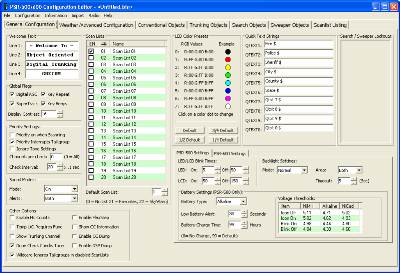
PSREdit500 allows you to program all the features of the new GRE PSR-500 and PSR-600 scanners.
The price for the software has been set to $35.00 per license.
Latest Software Updates:
PSREdit500 Version 1.67 Changes and additions (Released August 13, 2008)
- Fixed an error in the Scan List Listings page where selecting the
Favorites or Skywarn lists would cause an exception message, and then
make the Scan List listing page inoperable until the program was
restarted.
- Added a feature to have PSREdit500 store its screen position and size
when shutting down. At the next restart, the program will restore
itself to that location and size.
PSREdit500 Version 1.66 Changes and additions (Released August 10, 2008)
- Fixed the cancel button when attempting an upload to the radio without
a response. Previously you had to wait for the upload to time out as
the cancel button had no effect at that point.
- Added enabled radio buttons to the scan list listing page. These
radio buttons allow you to turn the selected scan list on or off and
work the same as the Scanlist Selection list on the General Settings
page.
PSREdit500 Version 1.65 Changes and additions (Released August 4, 2008)
- Added the ability to select which fields are shown and in what order
those fields are shown in the conventional, talkgroup, Search, Sweeper
and scanlist listing pages. To modify the defaults, click on the
Select Fields button in the lower right corner of those tabs.
- Fixed issue with PL tone decoding on some tone frequencies while
importing conventional data from the RadioReference.com web service.
- When Importing trunked systems from the RadioReference.com web service
where the system is a single site system with no control channels
listed, the RR import screen will switch the import type from control
channel only to all frequencies by default.
PSREdit500 Version 1.64 Changes and additions (Released July 21, 2008)
- Added support for the new 700Mhz frequency ranges supported in
CPU Firmware version 1.5 or higher.
- Added support for the new Radio ID Alert setting found in CPU
Firmware version 1.5 or higher.
- Added support for the new 5khz step size options found in CPU
Firmware version 1.5 or higher.
- Fixed an odd sorting issue when sorting objects by the scanlist
membership column. This is fixed on all object list screens.
- Fixed the browse option for the default data path option. The
button was previously inoperative.
- Added "tooltip" hints on all scanlist checkboxes on the various
object editor screens. These hints will show the current scanlist
alpha tag for that scanlist if you hover over the checkbox with
the mouse pointer. This option is OFF by default and must be
turned on in the new Screen Options tab in the configuration editor.
PSREdit500 Version 1.63 Changes and additions (Released July 11, 2008)
- Fixed a bug in the Save As processing where you would not be warned
about overwriting an existing file.
- Fixed a bug in the PL/DPL/NAC decoding when importing conventional
information from the RadioReference.com web service.
- Added the ability to Left Justify, Right Justify or Center the
welcome screen text automatically.
- The configuration screen is now a tabbed window. The Configuration
Menu was also reconfigured to give direct access to each tab.
- Added option to make a backup copy of a file before it is overwritten.
If this option is turned on, PSREdit500 will check to see if the file
exists just before saving the data. If the file does exists, the file
will be renamed to the same name, with ".bak" appended to the file name.
The new data will then be written to the original file name. This option
has an effect on the "Save", "Save As", and V-Scanner Download commands.
- Fixed an issue with port detection when the CCDump or DSPDump options
were turned on in the scanner.
- Fixed a software crash when using the Ctrl-UpArrow and Ctrl-DownArrow
key combinations to move objects in the Conventional, Talkgroup, Search,
and Sweeper listings and the object reached the top or bottom of the list.
PSREdit500 Version 1.62 Changes and additions (Released June 27, 2008)
- Added a Search for Port button to the serial port configuration
screen. This button will allow you to have PSREdit500 search through
all ports (COM1 through COM32) looking for a PSR-500 or PSR-600 scanner.
In order for this option to work, the USB cable must be connected to the
computer and the scanner, and the scanner must be turned on and not on
the password screen.
- Made the apply button in the Radio Reference Web service conventional
object editor bigger, with bold text. This button is now disabled by
default, and will be enabled whenever something is changed in the
selected object(s).
- Error detection and reporting from the Radio Reference.com web service
is now a little more robust, and will have a much better chance of
giving you the reason a request for data might fail.
PSREdit500 Version 1.61 Changes and additions (Released June 20, 2008)
- Added CSV import to the talkgroup list screen.
- Added Cut/Copy/Paste to the Talkgroup list screen. Standard
keyboard shortcuts (Ctrl-X, Ctrl-C, and Ctrl-V) are also
active on that screen.
- Fixed a crash bug on the Radio Upload/Download when the com
port was in use by another program (such as PSRCtrl500).
- Added Cut/Copy/Paste to the frequency list for the TSYS editor.
The options for the paste option work as follows:
If a column is tagged as an LCN column, frequencies will be inserted
in the frequency listing where the LCN points.
If there is no LCN column, then there is a pull down list in the lower
right corner of the listing. The options for this pull down are:
Fill In Blanks:
Frequencies will be inserted only where the frequency is set to 0.000000
Overwrite:
Frequencies will be placed in the list starting at position 1, overwriting
any frequencies are already in the list. This will continue until all
frequency records on the clipboard have been inserted, or until all 32
frequency slots have been filled in.
Selected Lines:
Frequencies will be inserted only in lines that were pre-selected before
the paste function was selected. This will continue until all data has
been inserted, or until there are no more selected lines to fill.
The paste screen will attempt to detect the frequency column automatically.
If the selection made is incorrect, you must set the column that was detected
to default before you will be able to select the correct column.
- The conventional import/Paste function now attempts to identify some column
types, specifically Frequency, Delay, Lockout, Attenuation, and Modulation.
All other columns must be set manually at this point.
PSREdit500 Version 1.60 Changes and additions (Released June 12, 2008)
- Added the checkbox for the new option to show Radio IDs.
PSREdit500 Version 1.59 Changes and additions (Released June 12, 2008)
- The Trial/Registration screen has been updated and now has a similar
look as the rest of the program. (If you've registered the software
already, you'll never see this)
- Added a Clear Description option to the pop-up menu for the Scan List
tag editor.
- Fixed a voltage display problem with the battery warning levels. This
screen now shows the actual voltages instead of a decimal version of
the internal code used by the scanner. You may also edit these values
as voltages, and the program will do the conversion for you.
- Removed the default delay when uploading the configuration to working
memory. The need for this delay was removed in the CPU Firmware Version
1.2 update. There is still an option on the Serial Port configuration
screen to add delay should you have an older version of Firmware on your
radio (although I recommend that you upgrade the firmware to the latest
versions)
- Radio IDs for private calls are now displayed in decimal form for all
system types (including EDACS) unless the display setting on the main
tab are set to HEX.
- Fixed an issue with entering and displaying Motorola Type I talkgroups
when those talkgroups appear in a S12 or S13 sized block.
- Fixed a Radio Reference trunked system import issue with converting and
displaying Motorola Type I talkgroups when those talkgroups appear in a
S12 or S13 sized block.
- The CSV Import option has been moved from the Import menu to the
conventional list pop-up menu. A new menu option will be added to the
talkgroup list once that work has been completed.
- The Conventional object list page now supports the Cut, Copy and Paste
operations from the windows clipboard. The standard keyboard shortcuts
(Ctrl-X, Ctrl-C, and Ctrl-V) are also enabled with this addition. This
function will display the same selection screen used by the CSV import
option.
- Added the "Hit Count" field to a list of available fields on the CSV and
clipboard import options on the conventional object list.
PSRCtrl500 Version 1.05 Updates
- The "Enable Auto Store" checkbox will now remain checked when changing
the screen layout.
- If the "Enable Auto Store" checkbox is enabled, and the program emulates
the F3 key press, the description text on the Enable Auto Store checkbox
will be bolded to indicate that an Auto Store has occured.
- Fixed a freeze issue where the program would not appear on the screen if
the USB cable was connected to the computer, and there was no scanner
connected to that cable.
PSREdit500 Version 1.58 Changes and additions (Released May 23, 2008)
- PSREdit500 now supports importing from a wide variety of comma separated
variable (CSV) files. When you select a file to import, the program will
parse through the file and bring up a screen with each column shown. At that
point, all you need to do is tell PSREdit500 which column is what field, and
the program will do the rest. At this time, only conventional frequencies are
supported with this option.
To specify the field, click on the column header. A pull-down list will be
presented where you can select the field type for the column. Fields
currently supported are:
|
AGC
|
- Controls turning on or off the AGC setting.
|
|
Alarm Type
|
- Controls the PSR-500 Alarm type
|
|
Alpha Tag
|
- Sets the Alpha tag for the channel
|
|
Attenuate
|
- Sets the Attenuate flag for the channel
|
|
Audio Boost
|
- Sets the Audio Boost flag for the channel
|
|
Delay
|
- Sets the delay on or off
|
|
Frequency
|
- Sets the frequency for the channel
|
|
LED Color
|
- Sets the LED color (0-8)
|
|
LED Flash
|
- Sets the Flash on or off
|
|
LED Latch
|
- Sets the LED latch flag
|
|
Lockout
|
- Sets the Lockout Flag
|
|
Modulation
|
- Sets the Modulation type (Defaults to AU)
|
|
Priority
|
- Sets the Priority Flag
|
|
Relm Code
|
- Sets the CTCSS/DCS modes and values based on a Relm Code
|
|
Tone
|
- Used to set the CTCSS/DCS/NAC code value
|
|
Tone Type
|
- Used to set the channel to CTCSS/DCS/NAC (Default is Search)
|
PSREdit500 Version 1.57 Changes and additions (Released May 11, 2008)
- Changed some memory management handling on the RadioReference conventional
import area.
- Removed the Mode setting from the Sweeper object editor. This item is not
used when in sweeper mode.
PSREdit500 Version 1.56 Changes and additions (Released 29-Apr-08, 9:30 PM EDT)
- When uploading a file to a vfolder, PSREdit500 will now turn off the
DSPDump option if it is on in the file before it is uploaded to the
VFolder location. If this flag is on when a file is stored to a vfolder,
you will not be able to load this configuration into working memory.
(You will see a VFOLDER ERROR message when trying to load, and working
memory will be initialized to factory defaults).
You can fix existing vfolder files by configuring those locations to
download and then re-upload them to the same locations. Download and
upload processes can be run on the same cycle if you like.
PSREdit500 Version 1.55 Changes and additions (Released 25-Apr-08, 12:30 PM EDT)
- Fixed an issue with the RadioReference.com import of both conventional and
trunked data from areas specified as an Independent City. Before this fix,
no data would be presented for import.
PSREdit500 Version 1.54 Changes and additions (Released 21-Apr-08, 11:00 PM EDT)
- This version has support for the new CCDump on/off command on the PC/IF port.
The CCDump and DSPDump commands are automatically turned off whenever an
upload or download are initiated. Since the radio will reboot after these
operations, these options will then return to normal at that point.
- Fixed an issue with the Conventional RadioReference.com import where
frequencies with DPL codes would be imported with the incorrect DPL code.
PSRCtrl500 Updates
- This version supports the new CCDump on/off command on the PC/IF port. This
allows PSRCtrl500 to concentrate on decoding the data that is being requested
without having to wade through the CC dump data.
PSREdit500 Version 1.53 Changes and additions (Released 27-Mar-08, 10:45 PM EDT)
- Added a preload button to the frequency table editor to preload the new
800 Mhz rebanded frequency tables for Motorola 800Mhz Rebanded systems.
- Radio Reference web import will now attempt to detect a rebanded system and
apply the custom table to make it work. If the program detects what it thinks
is a rebanded system, a message box will be shown to that effect.
- Added a rebanding tool to the TSYS editor. Clicking on the button will bring
up a listing of frequencies and a second column with the expected rebanded
frequencies where there is a planned pattern (in the 866-869 range). You may
edit the frequencies, or chose frequencies to skip when the apply button is
clicked.
PSREdit500 Version 1.52 Changes and additions (Released 17-Mar-08, 11:30 AM EDT)
- Added the extra "Independent City" text on the Radio Reference import
screen for those locations that use them (An example would be
St. Louis County and St. Louis City in Missouri)
- Fixed a bug in the check for new version area that would not honor the
Proxy settings (It helps to set the proxy information before sending
the request)
- All web services are now using a new web services library. This library
has better support for proxy servers. This library should also be able
to pick up the automatic settings used by Internet explorer.
PSREdit500 Version 1.51 Changes and additions (Released 12-Mar-08, 4:30 PM EDT)
- Fixed a bug on the Radio Reference Trunked system import for type I
and Type IIi systems where the fleetmap would not be properly
detected and stored on import.
- Fixed a bug in the RadioReference Trunked system import where the
threshold High and threshold Low settings would be reversed in
the TSYS object after the import was completed. This bug would only
affect TSYS objects that are using the Multi-site ROAM configuration.
- The Check for updates function is now using a new http library that is
supposed to be able to detect the proper proxy settings automatically.
If you are behind a proxy, please try setting the proxy settings on the
configuration screen to Use IE settings and let me know your results.
If this works, I'll port over the RR import functions to this new library
as well so we can put this issue to bed for good.
PSREdit500 Version 1.50 Changes and additions (Released 9-Mar-08, 10:30 PM EDT)
- Fixed an issue on the TSYS editor screen that would not allow
changing the Threshold Hi and Threshold Lo settings when in Roam Mode.
- Added proxy support for those that use a proxy to connect to the web.
If you use a proxy, you'll need to go to the configuration screen and
set the options that will work best in your situation. The read of the
Internet Explorer settings are working here, however I don't have a proxy
server to test with.
- With permission of the author, I have added an import feature for the ARC500
file format. This feature should be considered a BETA feature, since there
is no format data available other than the files themselves.
PSREdit500 Version 1.49 Changes and additions (Released 4-Mar-08, 12:00 Noon EST)
- Fixed a bug on the radio reference import screens where the user name,
password, country, State, and County would not be saved if the
PSREdit500.ini file did not exist.
- Added option under the Information menu to export a text file listing
of the scanlist Alpha Tags.
PSREdit500 Version 1.48 Changes and additions (Released 26-Feb-08, 10:45PM EST)
- Fixed a bug on the Battery Charge time that would not allow a value of
0 (disabled) to be set.
- Enabled direct edit of the Battery charge time, with proper bounds
checking allowing only values between 0 and 99.
- Fixed a bug with the Battery low alert time that would not allow a
value of 0 (Disabled) to be set.
- Enabled direct edit of the Low Battery Alert time, with proper bounds
checking allowing values between 0 and 60 seconds.
- Fixed a display issue when editing a EDACS or LTR TSYS object.
- Reorganized the tab stop order on the main screen.
PSREdit500 Version 1.47 Changes and additions (Released 25-Feb-08, 8:00PM EST)
- Reports on the running of a beta version suggest that the LCD Blink issue that
existed in version 1.45 and 1.46 may be resolved in this build of the software.
I did find some code issues, primarily with the direct entry of any of the LED
or LCD blink times.
- Bounds checking is now being properly done on the LED and LCD blink times.
The controls also now allow the values to go to their limits of 1 on the low end,
and 250 on the high end. These values are the number of milliseconds between
changes, divided by 10.
PSREdit500 Version 1.46 Changes and additions (Released 22-Feb-08, 6:15PM EST)
- Re-coded the frequency validation section on the TSYS editor. This should
hopefully correct the crash issue that some people are seeing in that area
of the program.
- The Scanlist listing will now preface wildcard objects to indicate whether
it is a Private or Group wildcard.
PSRCtrl500 1.04 Updates
- Added an option to add delay between polling cycles. This will reduce the
load on the CPU. Use caution when setting this option. If this delay is set
too high, the program will not track well. If you set this option to 0, you
will see the same response level and CPU usage as previous versions.
PSREdit500 Version 1.45 Changes and additions (Released 21-Feb-08, 1:15AM EST)
- Note that the executable file name has been changed from PSREdit.exe to
PSREdit500.exe. This was done to help reduce any future confusion
between PSREdit for the PSR-500 & PSR-600, and versions of PSREdit
for other scanner models.
- As part of the executable file change, the PSREdit.ini file name will
also need to be changed to PSREdit500.ini. Fortunately PSREdit500 will
take care of this for you. If the program does not detect the
PSREdit500.ini file in the program directory, it will check to see if the
PSREdit.ini file exists there. If it does exist, PSREdit500 will rename
that file to PSREdit500.ini and then load the configuration as it normally would.
- Added support for the new Multi-site STAT option to have it check all active
control channels on each pass through a TSYS Object. This option is available
on the TSYS editor, and on the RadioReference.com import screen.
- Fixed a minor display issue on the TGRP editor when an ampersand (&) was
used within the TSYS name.
- RadioReference web import of trunked systems will now use the number of sites
actually selected when determining how the Multi-Site option is set.
Previously this determination was done based on the number of sites
associated with the system, regardless of how many sites were actually
selected for import.
- Fixed an issue on the Radio Reference web import options screen (the one
that's shown after you've selected the sites and talkgroups you want to
import) where changing the system type would not enable the correct options
for that system type.)
- Fixed an issue with the setting of the backlight delay configuration for
the PSR-500. The Up-Down control would only go to 15 seconds, where the
radio is capable of up to 99 seconds. This control will now allow you to
set this value in a range of 1 to 99 seconds.
- Fixed a second issue with the setting of the backlight delay where direct
entering a value for the delay was not being properly applied to the
configuration. Now that this is corrected, there is also some limit
checking in place that will not allow an invalid value to be set.
PSRCtrl500 Updates
- Version now set to 1.03
- Fixed the RSSI tag being hidden and made visible while decoding.
- Fixed a bug where the decoding icon (The T Icon) was not being shown when
using the extra large display mode.
- The color of the letter on the decode icon (the T Icon) will now match the
background color when the backlight is on or off.
- Updated PSRCtrl500 to use the PSREdit500.ini file.
PSREdit500 Version 1.44 Changes and additions (Released 31-Jan-08, 10:45PM EST)
- Changed the SAME entry screen to ensure that a FIPS code entered will always
be 6 characters in length. If the code entered is less than 6 characters,
wildcard characters will be prepended to the entered code until the length is
correct.
- Found and fixed a bug in the TSYS editor where the multi-site options would
not always be properly updated.
- Fixed a bug in the TSYS editor where a flag was not set correctly on LTR
systems.
PSREdit500 Version 1.43 Changes and additions (Released 25-Jan-08, 3:45PM EST)
- Changed the import of conventional objects from another bin file to use
checkboxes to select which objects will be imported. This is more consistent
with other areas where conventional objects are displayed for import.
- Added option to the Search/Sweeper lockout list to add new frequencies to the
list.
- No updates to PSRCtrl500 were done for this release.
PSREdit500 Version 1.42 Changes and additions (Released 21-Jan-08, 5:30PM EST)
- Fixed crash bugs in the RadioReference trunked data import processing.
There were two separate areas that had this issue, and in my testing I
cannot get the import to crash where before I could do it on a regular
basis.
- Search and Sweeper objects may again be added to the Skywarn scan list.
It was brought to my attention after they were previously removed that
even though the radio itself doesn't allow you to add these types of
objects to those scan lists, they will work if added via software.
- Started the coding for CSV file import. There's a lot of work to be
done in this area of the program, so bear with me while I complete this
area. (Note that since this option is nowhere near completed, the option
has been disabled in the import menu)
PSRCtrl500 Version 1.01 Changes and additions
- Changed the method used to set the "Always on Top" setting on the window.
This method should be a little more reliable, and gets rid of the flash
that was occuring before.
- Added Extra Large Display mode. This mode will open a window that is just
under 640x480 pixels in size, and is very visible from a good distance away
from a normal size screen.
- Added extra test to determine which type of radio is connected to the
computer.
1.41 Changes and additions (Released 11-Jan-08, 6:00PM EST)
- The scanner control screen has been moved out of the main PSREdit500
program and into it's own separate program. Many updates have been
done to the scanner control program in the process, including adding
the ability to reduce the screen to only the display (in two sizes)
plus a few select control buttons, Remembering the last position of
the window, and the option to have the screen be always on top of
other applications. PSRCtrl500 is at version 1.00.
- Removed scanner control configuration information from the PSREdit500
program options screen. All configuration of the scanner control
screen is done within PSRCtrl500, with the exception of the Serial
port settings, which are done in PSREdit.
1.40 Changes and additions (Released 6-Jan-08, 8:30PM EST)
- Added code to the Radio Reference import area to attempt to detect
when your subscription has expired or is otherwise invalid. This
code is untested at this point (The Import is tested and works, I
just don't know for certain that the account closed issue will be
detected properly).
- An option has been added to the scanner control configuration screen
to use new smaller versions of the control screens. These smaller
versions should help on those screens that are at or below 1024x768
resolution.
1.39 Changes and additions (Released 5-Jan-08, 10:00PM EST)
- Added option to the scanner control to automatically detect the
type of scanner connected to the program. This option can be found
in the configuration page on the pulldown for the scanner type.
This detection may not be 100%, but in my testing it never got it
wrong if the scanner was on and plugged in when entering the scanner
control function.
- There is now a search function located on the Scanlist Listing page.
The scanlist select pull down has a "Filtered List" option at the
bottom of the list. Selecting this option will bring up a screen that
will allow you to enter the criteria for your search. A future
version will add the ability to edit objects in the Scanlist Listing page.
1.38 Changes and additions (Released 28-Dec-07, 3:15PM EST)
- Fixed a display problem on Motorola Type II systems where the
talkgroup number would come up blank on the screen.
1.37 Changes and additions (Released 27-Dec-07, 11:15PM EST)
- Fixed an issue where setting a group of conventional objects to NAC
search, the program would set the NAC to FFF instead of search mode.
1.36 Changes and additions (Released 27-Dec-07, 2:15PM EST)
- Fixed the modulation label on the scanner control screen when a frequency
was in the NFM mode. Previously the screen would show WFM instead.
- Added option to switch the scanner control screen to use the key layout
for the PSR-600 instead of the PSR-500.
- Added code to handle private IDs properly, particularily on EDACS systems.
- Code added to ensure that all Alpha Tags are properly padded with spaces
to correct an issue with partial tags being shown when the display
alternates.
1.35 Changes and additions (Released 23-Dec-07, 11:15PM EST)
- Added a duplicate check to the conventional and Talkgroup object screen.
These option are located in the Alt-Click menu at the bottom. Please
note the option on the main page entitled "Dupe Check Checks Tone" will
have an effect on what conventional objects are considered duplicates.
1.34 Changes and additions (Released 20-Dec-07, 11:00PM EST)
- Fix to RR Web import on trunked systems not properly padding the
system name. This issue would cause the scanner to display the system
name and part of the talkgroup name when alternating.
- PSR-500 and PSR-600 items have now been separated into their own "tabs"
on the main page. Note that the LED and LCD blink times are shared
between both, as is the backlight mode.
- Battery voltage settings are now editable. Previously they were only
shown in PSREdit500 with no option to change them. They may be edited in
place without the need to bring up a separate edit screen.
1.33 Changes and additions (Released 17-Dec-07, 9:30PM EST)
- The LED indicator on the remote control screen was missing. This has been corrected for this release.
1.32 Changes and additions (Released 17-Dec-07, 8:30PM EST)
- Corrected an issue entering a NAC search code.
- Changed the default font used on all forms. This should resolve the issue
for those users that are using 120 DPI screen resolution on their computers.
- The scanner control feature has been disabled for screen resolutions other
than 96 DPI. This screen will not appear properly on a computer using a
120 DPI screen resolution. I am working on a fix to this issue, but it will
take some time to complete so the option will be disabled in the mean time.
1.31 Changes and additions (Released 16-Dec-07, 12:00PM EST)
- Added support for the holding a key on the scanner control screen.
This is typically used to turn on the backlight and have it stay on.
To use this function, press the Ctrl key, and then click on the desired
button on the scanner control screen.
- Fixed an issue with the LED color rendition on the scanner control form.
- LED On/Off and LCD On/Off timers are now directly editable, and have
a range from 1 to 255.
1.30 Changes and additions (Released 13-Dec-07, 10:45PM EST)
- Added support for PSR-600 specific settings. These are mainly in the
backlight, Battery, and LED settings.
- Added support to consolidate and sort objects. This option is located
under the Information menu. You may sort the objects in the radio based
on object type as a first selection. After that you may sort conventional
objects based on your preference of Frequency, Alpha Tag, Mode, Tone,
Priority, Hit Count, and First Scanlist. Trunked systems may be sorted
based on the system first, followed by the Talkgroup ID, Alpha Tag,
Type (Group or Private), Priority, Hit Count, and first Scan List.
- Added remote scanner control for the PSR-500 (It should work for the
PSR-600 as well, but the key layout is in the PSR-500 format)
- Fixed a crash bug on radioreference imports where the systems have been
removed due to US Government request (i.e. MacDill AFB in Florida)
- Fixed a bug in both SRCH and SWPR objects when adding new objects with the
Use Highwater mark option turned on.
1.29 Changes and additions (Released 4-Dec-07, 11:30PM EST)
- Fixed a problem in the RadioReference Trunked System Import where the number
of frequencies on a site exceeded 32 frequencies, the program would crash.
1.28 Changes and additions (Released 4-Dec-07, 5:30PM EST)
- Fixed a long standing issue when using COM ports above COM9.
This version should work on all valid COM ports.
1.27 Changes and additions (Released 3-Dec-07, 10:30AM EST)
- Fixed the screen width to fall within the 1024 screen width by default.
- Corrected an issue on the redioreference.com conventional import where a second
import that had more frequencies than a prior import would still list a few of
the frequencies from the prior import. These frequencies would not be imported,
but having them listed was unexpected and caused some confusion.
1.26 Changes and additions (Released 2-Dec-07, 7:00PM EST)
- Radioreference.com conventional data import is now operational in this
version. It is available under the Import menu.
- Removed the Skywarn scanlist option under both SRCH and SWPR objects.
These object types are not allowed to be members of the Skywarn Scanlist.
- Fixed an issue when deleting SWPR and SRCH objects where the objects
would still show up on the ScanList listing, but with invalid object
ID numbers.
1.25 Changes and additions (Released 27-Nov-07, 5:15PM EST)
- Fixed the action when checking or unchecking the delay option on the
edit screens.
1.24 Changes and additions (Released 22-Nov-07, 4:30PM EST)
- Released primarily due to an error when releasing 1.23 (Sorry about that)
- Fixed a minor cosmetic issue with the Conventional object editor.
1.23 Changes and additions (Released 21-Nov-07, 11:45AM EST)
- Added option to the temporary key delay screen to remove the key from the
system. This will allow you to enter your purchased key and remove the delay
screen at startup.
- Added option under the Help menu to remove the software key from the computer.
This should be used when you are removing the software from a computer.
1.22 Changes and additions (Released 19-Nov-07, 11:30PM EST)
- Added option in the Web Import screen to save the last used
Country, State, and County.
- Fixed a display bug in the Import options screen when importing a
LTR system.
- Web import now detects Splinter systems and sets the system type
accordingly.
- Fixed problem with Limit Searched created with PSREdit500 not working
in the radio.
- Fixed a bug in the scanlist listing where the list would not be
updated when the scan lists for an object were changed in the
Conventional and Talkgroup screens.
- When editing Search or Sweeper objects, the corresponding items
in the Scanlist Listing screens were not being updated at all.
This has been fixed for this release.
1.21 Changes and additions (Released 17-Nov-07, 12:15AM EST)
- Fixed a bug that would add a limit search with an invalid search type code.
- Fixed a display bug where all SRCH type objects would be shown as
SWPR objects in the Scanlist Listing tab.
- Fixed a math error on the RR web import where the calculcations at the
bottom of the screen were not taking into account the number of TSYS
objects to be created when counting file blocks for TGRP objects (a copy
of each selected TGRP object is created for each TSYS to be created).
- Fixed a bug in the ScanList Listing when removing multiple objects from a
scanlist that would cause a crash.
- Socket errors on the web import are now handled properly, so that crash
issue has been resolved.
- Added "Select All Sites" and "Unselect All Sites" buttons to the site list
on the RR Web Import Screen.
1.20 Changes and additions (Released 16-Nov-07, 10:15AM EST)
- Fixed a rounding error bug when using custom frequency tables.
- Radio Reference import of Trunked data is now in the program.
It can be found in the Import menu. Import of Conventional data
will follow asap.
Known Issues:
| - |
Currently the web import will not properly detect a Motorola
"Splinter" system. If you are importing one of these systems,
you will need to edit the created TSYS Object(s) to set this
option.
|
| - |
The module currently does not handle network errors very well.
If you have any Internet connectivity issues, the program may
crash. I suggest you save your data before attempting an
import from RR.
|
- Since we are nearing the end of many people's 30 day free trial, I am
issuing a temporary license that will work until November 30, 2007.
The program will display a notice screen for 15 seconds before you may
use the program when using this key.
To use this demo key, use the following:
| |
Registration name: |
Demo Key |
| |
Serial number: |
JYFF-3WEM-WXQH-WLY7 |
1.19 Changes and additions (Released 13-Nov-07, 4:45PM EST)
- Fixed a sort issue on the talkgroup listing when talkgroups are displayed in
HEX format. Also fixed in the Scanlist Listing screen.
- Added a reset all Global Settings button to the Weather/Advanced settings tab.
This button will reset all global settings except for the Welcome message,
SAME Entries, Quick Text entries, and Scanlist names to their default
settings.
- Removed the Global Attenuation settings box from the program. After
research by the GRE team, these indicators are not only used and updated by
the radio under certain cases, so getting them to "stick" through software
is difficult at best. This item was removed based on the recommendation from
the GRE development team.
- The "Dwell Time" field is now editable (it was before, but the value entered
was not checked for valid range, and was not stored properly)
- Ctrl-UpArrow and Ctrl-DownArrow will now move a selected object up or down
respectively in the object listings (same as pressing the Move Up or
Move Down Buttons)
1.18 Changes and additions (Released 9-Nov-07, 10:30PM EST)
- Added the Max Tunes per Scanning Cycle setting to the extended
configuration tab.
- Fix to talkgroup objects not being removed from the ScanList
listing when the TSYS Object they are a member of is deleted.
- Fix to deleting a TSYS object not setting the modified flag.
1.17 Changes and additions (Released 7-Nov-07, 11:45PM EST)
- Removed a debugging pop-up window in the V-Scanner Download section of the
program.
- Fixed a lock-up bug in the Pro-96 import when the configuration contains an
800 Mhz Type I system using a non-standard fleetmap.
1.16 Changes and additions (Released 6-Nov-07, 10:15PM EST)
- Fixed a bug in the Conventional, Talkgroup, Search, and Sweeper screens
where deleting an object would not remove that object from the Scanlist
Listing screen.
- Adjusted the Blue LED settings on the default buttons on the main page.
The values being calculated for the Blue LED were not accurate once
transferred to the radio. (The 1/4 Default setting would actually turn
the Blue LED off)
- Clicking File->New will now use the new default settings from CPU
Firmware update Version U0.2.
1.15 Changes and additions (Released 6-Nov-07, 10:15PM EST)
- Added a "Load Presets" option to the V-Scanner area. A Preset is a list
of .bin files that will be loaded into the V-Folder slots in the
PSR-500 when the list is selected.
When you create a V-Folder preset, and then click on the "Load These
Presets" button on this screen, All actions (both Erase and Upload
actions) necessary to set the scanner to be the same as the preset are
scheduled in the V-Scanner action list. You may then adjust how the
actions will be applied as necessary before clicking on the
"Apply Actions" button to commit the changes.
- Added option in the Import from file area to import SAME codes from
another file.
- Fixed the color display on the main page when the Default buttons were
used.
1.14 Changes and additions (Released 5-Nov-07, 12:00PM EST)
- Corrected a speed issue when reading V-Scanner names from the Pro-96 and
Pro-2096 scanners.
- Added Left Justify, Center, and Right Justify buttons to the object list
screens. These buttons will justify the alpha tags for all selected objects
based on the button pressed.
- Removed the "Verbose Scan Information" checkbox. I could not find a
corresponding menu option on the PSR-500, and changing the value didn't make
a difference I could see.
- Added a checkbox to enable the DSP Dump option on the PSR-500. This option
basically replaces the Verbose scan option that was on the main screen.
- Added more presets for colors of the LED. Buttons are available for Defaults,
3/4 Default, 1/2 Default, and 1/4 default.
- PSREdit500 now enforces the limits for RSSI values for the signal strength bars.
- Added option to the Serial Port Configuration screen to add extra delay while
uploading the configuration to the radio. This should be used whenever you
are seeing checksum errors or incomplete uploads. This option does add about
10 seconds to the total upload time.
1.13 Changes and additions (Released 3-Nov-07, 7:45PM EDT)
- Added a Check for Updates menu option to the Help menu. This option
will connect to http://www.psredit.com to retrieve a listing of the
currently available version of the software and compair it against the
version of the software you are running. If a newer version is
available, you will be asked if you would like to visit the web site
to download a newer version.
- When editing multiple objects, the Alert Type, Backlight Mode, and LED
settings are now updated separately. With this change, you can now
modify the backlight settings of multiple objects, without modifying
the individual alarm types or LED configurations.
- The signal strength RSSI settings on the advanced tab were not being
reset when the Reload Defaults button was clicked. This has been fixed
in this release.
- Fixed a rounding error on some frequencies in the Custom table area of
the TSYS editor.
- Enabled the Scanlist listing screen. This screen allows you to list all
scanable objects by scanlist. This gives you a better way to see what
objects are in each individual scan list.
1.12 Changes and additions (Released 2-Nov-07, 1:00PM EDT)
- Added new options to all screens that allow you to edit the scan lists of
multiple objects. These options allow you to Add selected scan lists to all
selected objects, Remove the selected scan lists from all selected objects, or
set all objects to use only the selected objects (This is the old behaviour).
- Fixed a tab order issue on the Talkgroup object edit screen.
- Added delete confirmation box when deleting Search objects.
- Fixed a bug where the Backlight area global setting was not being saved when
a configuration was uploaded to the radio or saved to a file.
1.11 Changes and additions (Released 31-Oct-07, 9:30AM EDT)
- Added new menu option under the Configuration top level menu titled "Program options"
- Added option to use a "High Water Mark" when adding new objects. The default
action of PSREdit500 is to add new objects in the first available object ID slot.
This slot may be from a previously deleted object, or at the end of the list
depending on how you've been editing your configurations.
With this option enabled, new objects will always be added to the end of the
list of object IDs as long as the highEDT possible Object ID (1851) has not
been already assigned. If that object ID has been already used, PSREdit500 will
revert to the standard method of assigning Object IDs.
- Added option to load the last file that was opened by PSREdit500 when the program
starts up.
- Fixed positioning issue with the "Move Up" and "Move Down" buttons on the
conventional and Talkgroup list screens.
- Added code to make the color rendition on the screen a little closer to what
the radio will display.
1.10 Changes and additions (Released 31-Oct-07, 10:40AM EDT)
- Posted primarily due to a publishing error on my part for version 1.09.
- Corrected a scrolling issue when adding new talkgroups using the Duplicate
talkgroups menu option.
1.09 Changes and additions (Never properly released)
- Fixed a download bug that would cause intermittent download failures
from the scanner's working memory.
- Internal changes to V-Scanner downloading to be ready for any future
changes that may occur in this area.
- Completed the Move Talkgroup(s) to another system menu option on the
TGRP list screen.
- Fixed a bug in the limit search edit function that would round off the
limit frequencies to the next lowEDT 1Mhz frequency.
- Support for moving Conventional and TGRP objects around within the
listings screens. At this point you can only move one object at a
time either up or down within the list.
1.08 Changes and additions (Released 29-Oct-07, 10:45PM EDT)
- Fixed a problem downloading the configuration when the DSPDump option was
turned on.
- Support for downloading the configuration from the Pro-97 and Pro-2055
scanners. This feature is now a public feature. Please let me know if you
see any issues with the read of the data.
- Added Dupe function to the TSYS object area. This new button will allow you
to duplicate the currently selected TSYS object. Note: Only the TSYS object
will be duplicated. TGRP objects will not.
- Enabled the Normal/Default setting on the TSYS Editor when the P25 Manual
system type is used. When this radio button is used, the radio will use it's
own internal default tables based on the frequencies in used within the TSYS
object.
- Numerous fixes to the Motorola Type I talkgroup display and decode processing.
1.07 Changes and additions (Released 28-Oct-07, 12:45AM EDT)
- Reorganized the object editor screens to put Frequency/Talkgroup fields first
on all editors. Having the Alpha tag field first didn't seem logical to me.
- Fixed issue with import of conventional objects where a specific scan list
was selected for the import. Before the fix all conventional objects would
be imported into the same scan lists they were members of in the source file.
- Fixed a problem when editing the alarm and backlight settings for multiple
talkgroup objects.
- Fixed an issue with direct entry in the NAC box on the conventional object
edit screen.
1.06 Changes and additions (Released 25-Oct-07, 11:15PM EDT)
- You may now direct edit the CTCSS/DCS/NAC edit boxes on the Conventional
object editor screen. If the value is invalid, these boxes will revert to
either the closEDT valid entry, or to Search mode.
- Fixed update bugs on many edit screens where pressing the Enter key would not
do validation checks on some fields when the editor exits.
- Created new Import top level menu. The "Import from Pro-96/Pro2096" and the
"Import objects from another file" options have been moved to this menu.
- Conventional objects may now be imported using the Import from another file
menu option.
- Added duplicate conventional object menu option in the conventional list. It
only allow you to duplicate one object at a time.
1.05 Changes and additions (Released 24-Oct-07, 10:30PM EDT)
- Fixed Pro-96 Import conversion of Motorola VHF/UHF systems. This only occured
on single table systems. Multi-table systems would import correctly.
- Fixed a bug in the conventional object editor where some changed settings
would not update all of the selected objects.
1.04 Changes and additions (Released 24-Oct-07, 2:15PM EDT)
- Fixed a bug in the frequency conversion when adding a new TSYS object.
(Frequencies were getting saved as 0.000000)
1.03 Changes and additions (Released 24-Oct-07, 1:00PM EDT)
- Fixed crash when adding wildcard talkgroup objects.
- Fixed crash when editing multiple talkgroup objects.
- Fixed crash when editing multiple conventional objects.
- Corrected an issue where you could not exit the frequency edit box in the
TSYS editor unless you entered a valid frequency.
- Fixed an issue with the battery charge time setting not allowing a value of
0 (for charge disable).
- Fixed a crash bug when adding a Motorola VHF/UHF TSYS objects.
- Fixed bug when adding or editing a service search object not changing the
mode setting (Always AM).
- Fixed hit counter not being set to 0 when adding search or sweeper objects.
- Removed the Bold attribute from all list boxes. It looks much cleaner this way.
1.02 Changes and additions (Released 23-Oct-07, 11:30PM EDT)
- All listboxes can now be sorted in both ascending and descending order on
all fields. If the selected fields are the same, the Object ID is used in
its place.
- All screens will now default to the first field when they appear. Previously
the default position on the screen would be the last field edited. This also
highlights that field (Typically it's the frequency or talkgroup number) so
that you only need to start typing to change the value.
- Added the "Tune Mode" third line option to the Advanced configuration area.
The LED option for Tune mode was also moved to the same location.
- Added support for Ctrl-A (Select all) to all listviews.
- Added option on system import to force all imported talkgroups to a specific
scan list.
- Fixed a bug in the conventional frequency entry where rounding errors were
occuring on some frequencies.
|